
Travel and expense management for SAP SuccessFactors: from trip request to financial posting
Trippy handles trip requests, approvals, per diems, mileage and corporate cards, then passes posting-ready data to finance. Built for SAP SuccessFactors.
A two-day business trip to a customer in Vienna usually leaves behind a wallet full of receipts, an approval buried in someone’s inbox and a question from accounting about which project the costs belong to. Trippy connects these steps into one process. Whatever the employee enters in the request is reused for the approval, the expense report and the accounting entry.
Book a demoHow a business trip works in Trippy
The employee fills in a business trip request: where and when they are travelling, how they will get there and which cost centre or project the trip belongs to. They can request a travel advance in the same form. The request then follows your organisation’s approval rules.
During the trip, receipts are photographed on a mobile phone and attached to the expense report later. Back home, the employee creates the trip claim directly from the original request and only adds what actually happened. Frequent travellers can settle several trips in one claim. Trippy calculates the allowances, deducts any advance already paid and flags receipts that may have been claimed before. Once approved, the money is reimbursed through payroll or by bank transfer, whichever the employee has chosen. For month-end closing, Finance has a report of trips that have taken place but are not yet settled.
Per diems and travel allowances under Czech labour law
Trippy calculates per diems for you. It works out domestic and foreign per diems based on trip duration and reduces them for breakfast, lunch or dinner provided to the employee. Rates for the Czech Republic and dozens of foreign destinations come preconfigured. When new statutory rates are published, your administrator updates them directly, with no need to wait for the vendor. New rates apply from their effective date, while earlier trips keep the rates that applied at the time. Exchange rates are loaded automatically from the Czech National Bank.
Approvals based on who is accountable for the cost
A line manager needs to know when someone will be out of the office, but the budget often belongs to someone else. Trippy can involve the line manager from SAP SuccessFactors, the cost centre owner and the project approver, and add Finance or other roles where needed. Approvers receive notifications and reminders, and incomplete requests can be sent back for more information. Before going on holiday, an approver can hand their decisions over to a deputy.
Corporate cards from application to settlement
In many organisations, a corporate card starts as a bank form and ends with someone in Finance matching statements line by line. In Trippy, employees apply for a card within the app. Their details are prefilled from SAP SuccessFactors, they confirm consent to payroll deductions in the same step, and the application goes through approval like any other request. Limits, expiry, renewal and current balance are then visible in one place. Balances arrive via the API from your own systems, where your bank data already lands. When an employee pays by card on a trip, Trippy knows the card was valid at the time and keeps those payments separate from out-of-pocket expenses in the settlement.
Mileage reimbursement for private vehicles
Normally, employees provide vehicle registration documents and fuel consumption figures with every claim, and Finance looks up fuel prices. In Trippy, employees register their car once, with documents attached, and their manager approves it. On the next trip they simply select the vehicle, and Trippy calculates the basic mileage allowance and fuel reimbursement from the car’s consumption and the current fuel price. This works for electric cars, motorcycles and lorries too.
Everyday expenses outside business trips
Parking, a client lunch or small office purchases are not business trips, but they still need to be reimbursed and posted. In Trippy, employees enter them as standalone expense claims with a photo of the receipt, and they follow the same approval and posting process as a trip.
One application for a group of companies
Each company in a group can have its own per diem rates, approval workflows and payment methods. Employees still use the same application, and each company’s Finance team sees only its own records.
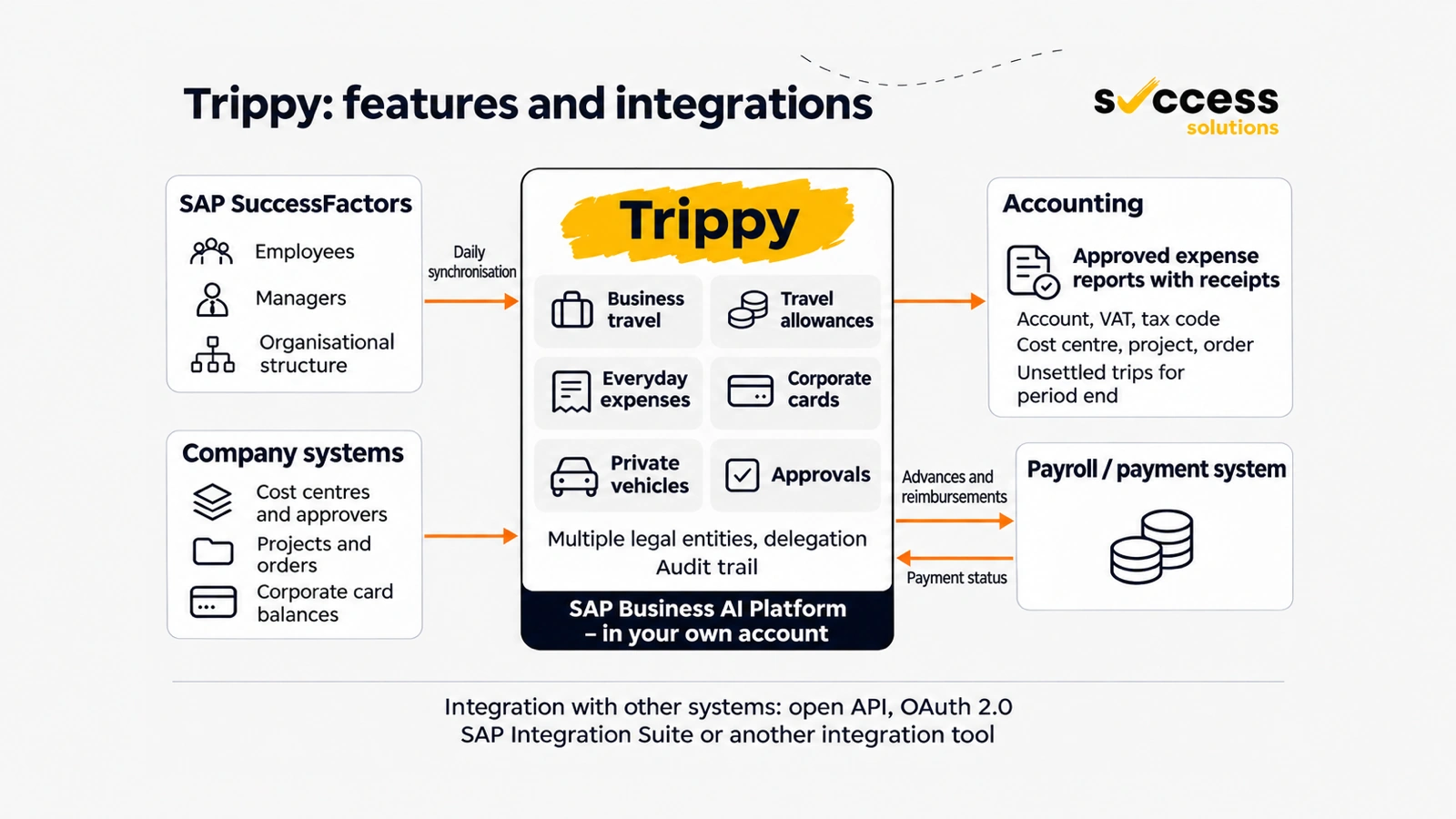
Integration with SAP SuccessFactors, finance and payroll
Trippy, like the other 2S Apps, does not require SAP S/4HANA. It runs on SAP Business AI Platform (formerly SAP BTP) in your own account, so your data stays with you. It is connected to SAP SuccessFactors from day one. Employees, managers and the organisational structure are synchronised every day, and people sign in the same way they sign in to SAP SuccessFactors. When someone joins or changes manager, Trippy picks it up by the next day, without anyone setting up users manually.
Trippy exchanges data with other systems through an open API secured with OAuth 2.0. Your finance system picks up approved settlements in which every line carries the G/L account, VAT, tax code, cost centre, order or project, and a link to the receipt. It can be posted directly in SAP or any other system. Payroll or your payment system collects advances and reimbursements in the same way and sends the payment status back, so employees can see that the money is on its way. In the other direction, you send cost centres with their approvers, projects, orders and corporate card balances from the systems where you manage them today.
You can connect Trippy through SAP Integration Suite or any other integration platform your organisation already uses. Notifications and reminders are sent through your own email server, including Microsoft 365. Every step is traceable, showing who did or approved what, even when they acted on someone else’s behalf.
Frequently asked questions
Does Trippy calculate per diems under Czech labour law?
Yes. It calculates domestic and foreign per diems based on trip duration and reduces them for meals provided. Administrators can update the rates themselves.
Do we need SAP S/4HANA to use Trippy?
No. Trippy requires SAP SuccessFactors Employee Central and runs in your own SAP Business AI Platform account. Your finance and payroll systems can be from any vendor.
How are employees reimbursed?
Through payroll or by bank transfer, depending on the employee’s choice and the options your organisation enables.
Can Trippy handle several companies in a group?
Yes. Each company can have its own rates, approvals and payment methods within one shared application.
See Trippy on one of your own business trips
In a demo, we will walk through one of your typical business trips with you: who submits it, who decides on it and what Finance needs to close it. A real example is the quickest way to see how much work Trippy can save you and how it fits into your systems. We install Trippy in your SAP Business AI Platform account and configure it to your rules.
Book a demo