
HR Document Automation: From SAP SuccessFactors Data to Secure Storage
See how HR data, document creation, electronic signatures, storage in SAP SuccessFactors and ongoing records management form one connected process.
An employee moves into a new role and needs an amendment to their employment contract. The company already holds all the required information in SAP SuccessFactors. Yet an HR specialist opens a template, enters the same data again, saves the document, converts it to PDF and sends it for signature. Once signed, the document is downloaded, renamed and uploaded back to the employee’s folder.
Preparing one document takes only a few minutes. When HR repeats the same procedure for tens or hundreds of employees, those minutes turn into hours of administrative work. Even more time goes into checking the process, locating signed versions and confirming that every document has been stored in the correct place.
Digitalisation Does Not End with Creating a PDF
Replacing a paper contract with an electronic document does not automatically change the underlying process. Data is still entered manually, files still travel by email and different versions remain stored on different computers. The organisation uses less paper, but the process remains fragmented.
Real change starts when every step leads directly to the next one. The document is created from current HR system data, follows the defined approval and signature workflow and automatically returns to the correct employee record when completed.
HR no longer moves files between several tools. The team focuses on document content and on exceptions that require an informed decision.
Every Document Follows a Journey
Employment contracts, salary statements, certificates of employment and handover records contain different information, but their journeys through the organisation have much in common. They start with employee data, use an approved template, pass through a review and reach the people who need to sign or receive them.
These handovers create most of the unnecessary work. One person downloads the document, another renames it, someone else uploads it to a signature platform and the completed version is then returned to the HR system. Every manual step creates room for an incorrect version, a misplaced file or an unfinished document being overlooked.
An automated process removes these handovers. Data, document generation, signature and final storage become one connected journey.
Document Generator Connects HR Data with Document Workflows
This is the principle behind Document Generator – Automation of HR documents & electronic signatures. The solution extends SAP SuccessFactors Employee Central and uses information already stored in each employee record.
Document Generator retrieves the required data, inserts it into an approved template and prepares the final document. HR teams maintain standard template content in Microsoft Word or PowerPoint. They update wording, formatting and standard clauses directly, without depending on IT for everyday changes.
Templates also work with conditions. Different content appears according to country, language, company, position or employment type. HR therefore maintains one controlled set of approved documents instead of numerous nearly identical files.
Documents are created individually in response to a specific request, automatically following an event in the HR system, or in bulk for a selected employee population. Every method uses the same source data and the same approved templates.
Signing Follows Without Manual Handovers
Once created, the document moves directly into the required approval or signature process. The system routes it to the right people in the defined order and retrieves the final version when the process is complete.
Electronic signing is no longer a separate step that requires HR to download and upload the document again. It becomes an integral part of the complete document workflow.
HR sees the current stage of every document and works with its completed version. Employees receive documents when they need them, without unnecessary handovers between departments.
For One Customer, We Connected the Entire Document Lifecycle
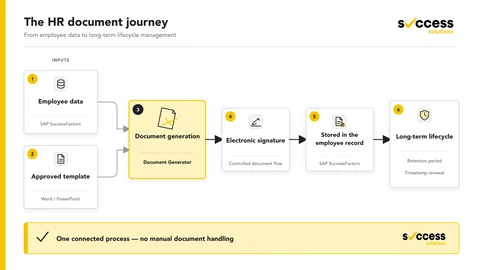
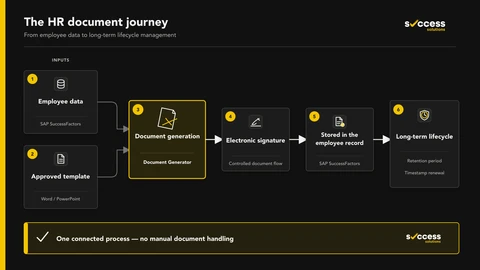
In one of our implementations, faster document generation alone was not enough. The customer needed to cover the complete journey from employee data to long-term document storage.
The process starts in SAP SuccessFactors. Current employee data is used to create a personalised document from an approved template. The document then proceeds to electronic signature without HR moving it manually between systems.
Once signing is complete, the final document automatically returns to the relevant employee record in SAP SuccessFactors. HR does not download, rename or manually file it. The process preserves the relationship between the document and the employee it belongs to.
The journey continues after storage. The solution monitors the defined retention period and the connected service renews the electronic timestamp at the required intervals. The document therefore remains a controlled part of the employee record long after it has been signed and stored.
The result is more than a file produced faster. The customer gained one connected process combining current HR data, approved templates, electronic signatures, storage in SAP SuccessFactors and ongoing document management.
HR Stops Moving Files
The most important change is not visible in the document itself, but in the everyday work of the HR team. HR specialists no longer re-enter information, search for the correct template or check email inboxes to see whether a document has returned signed.
Their attention shifts from administrative handling to document content, process quality and situations that require individual assessment.
The same principle applies to employee self-service. When an employee needs a standard confirmation for a bank, school or public authority, they generate it from an available template. The document uses current data and HR no longer handles another repetitive request.
A Strong Implementation Starts with How People Actually Work
Document automation does not start with installing an application. It starts with understanding how a document moves through the organisation: who creates it, where its data comes from, who checks the content, who signs it and where the completed version is stored.
Only then does it make sense to configure templates, decision rules, approvals, signatures and connections between systems. Technology follows the real process and removes the points where people repeat work or wait for the next step.
The first deployment typically focuses on a frequently used document that consumes a significant amount of HR time. Once the process has been verified, the same approach expands to other document types, countries and organisational units.
A Document Should Be Completed, Not Just Created
The goal of automation is not to generate more PDF files. The goal is to ensure that the right document is created from current data, reaches the right people and ends up in the correct place when completed.
Document Generator connects this journey with SAP SuccessFactors and electronic signature solutions. HR gains a controlled document process that does not end when someone clicks “Generate”, but when the document is signed, stored and ready for ongoing management.
Want to connect document creation, signing and records management in the same way? Explore Document Generator or talk to us about a specific document process in your organisation.