HR documents from SAP SuccessFactors – individually, automatically and in bulk
Create employment contracts, amendments, salary statements and other personalised HR documents using current SAP SuccessFactors data. Connect Microsoft Word templates with DOCX or PDF outputs, secure storage and electronic signatures.
HR documents without retyping data or manual exports
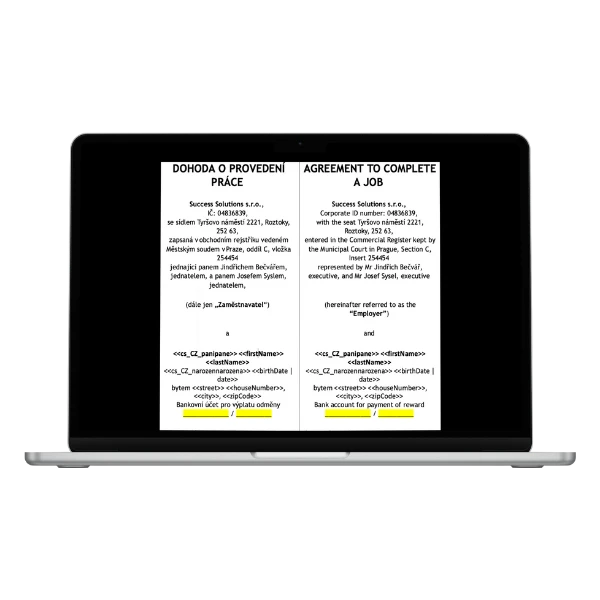
Document Generator extends SAP SuccessFactors with controlled creation of employment-related and other HR documents. Current employee, job, company and country data is inserted into a prepared Microsoft Word template, so HR teams do not need to copy information repeatedly or merge it from exports.
The completed document can remain in DOCX format, be converted to PDF, stored in Microsoft SharePoint or Google Drive, or sent for electronic signature.

What one process brings together
One controlled process connects employee data, corporate documents, required outputs and downstream processing.
Current SAP SuccessFactors data: Personalised information is populated from Job Information and Personal Information. Users work only with employees and data they are authorised to access in SAP SuccessFactors.
Microsoft Word templates: Keep your corporate design, legal wording, formatting and language variants. Prepared placeholders connect the template content with SAP SuccessFactors data.
Three generation modes: Create documents individually, automatically through a configured scenario or in bulk for a selected employee population.
Outputs, storage and signatures: Work with DOCX or PDF, distribute the result by email, store it in SharePoint or Google Drive, or send it for electronic signature.
Templates for different companies and countries
Maintain separate templates for different companies, countries, legal entities, languages and document types, all using shared SAP SuccessFactors data.
From template to completed document
The following steps show how a template and authorised SAP SuccessFactors data become a completed document ready for distribution or signature.
- The template is prepared
A Microsoft Word template is created with the corporate design, wording and placeholders for SAP SuccessFactors data. Separate templates can be maintained for different companies, countries or document types. - The process rules are applied
The application applies the appropriate template, rules and target employee scope according to the selected process. - Permitted data is loaded
Document Generator uses the required Job Information and Personal Information data. The employees and data available to each user are controlled by their SAP SuccessFactors permissions. - The personalised document is created
The data is inserted into the corresponding placeholders, producing a DOCX document for one employee or a set of documents for the entire selected population. - The output and destination are selected
The document can remain in DOCX format, be converted to PDF, sent by email, stored in Microsoft SharePoint or Google Drive, or passed to a downstream system. - The document can proceed to signature
Depending on the configured process, the result can be sent to a supported electronic signature platform. With selected integrations, downstream processing can continue after all parties have signed.
Microsoft Word templates that HR teams already know how to use
Each document starts with a Microsoft Word template. Keep your corporate design, document structure, legal wording and language variants, and connect them to SAP SuccessFactors data through configured placeholders.
Templates can be managed separately for different companies, countries and document types. Text and formatting are maintained in Word, while data mapping and process rules are configured in Document Generator.
Bulk documents without spreadsheets, exports or manual data merging
Bulk generation allows HR teams to create documents for a larger employee population in one step. Administrators can configure, add, remove and reorder the filters used to define the target group.
Filters can use data from both Job Information and Personal Information. Employees can therefore be selected by company, country, organisational unit, job assignment or a value stored on the individual employee record.
- select the target population directly from SAP SuccessFactors data;
- apply one template to the full employee selection;
- use the access and data restrictions configured in SAP SuccessFactors;
- support multinational organisations and multiple legal entities.

Creating the document is only the start. What happens next matters.
A generated document can remain in DOCX format or be converted to PDF. The optimised conversion service supports higher document volumes, so bulk generation does not need to end with manual conversion of individual files.
Depending on the configured process, a document can be sent by email, stored in Microsoft SharePoint or Google Drive, or passed to another system. The SharePoint connector uses a private certificate stored securely in SAP BTP.
From generated document directly to electronic signature
Document Generator can optionally be connected to electronic signature platforms. Supported integrations include Signi, SOFA, Signosoft, Evrotrust and DocuSign. The appropriate solution is selected based on the country, required signature method and customer process.
Once generated, a document can enter the signing process without manual downloading and re-uploading. Selected integrations allow the signature request validity to be configured using template-specific data, and a webhook can trigger follow-up processing after all parties have signed.
- DocuSign
- Evrotrust
- Signi
- Signosoft
- SOFA
Benefits for every role
HR teams: Prepare personalised documents without repetitive copying or manual data merging. The same process can be used for one employee or a larger population.
Managers and authorised users: Work only with approved templates and employees they are authorised to access. They can create a document without transferring data between several tools.
HRIS and IT administrators: Configure mappings, automated scenarios, filters, permissions and connectors. Document wording and design can remain in the familiar Microsoft Word environment.
International HR organisations: Maintain separate templates and language variants for different companies, countries, legal entities and document types using shared SAP SuccessFactors data.
Secure access to SAP SuccessFactors data
Document Generator uses standard SAP SuccessFactors object and data permissions. Users therefore work only with the employee data and populations they are authorised to access in SAP SuccessFactors.
Application MDF objects are secured, and users do not need privileged Admin API access. Sensitive technical credentials, including the SharePoint certificate and access to PDF conversion, are stored securely in SAP BTP.

What can you automate with Document Generator?
Show us your document. We will show you how to automate it.
During a practical demo, we will review your templates, SAP SuccessFactors data, bulk-generation requirements, and the required signature and archiving process.
Frequently asked questions about Document Generator
- What is Document Generator?
Document Generator connects SAP SuccessFactors data with Microsoft Word templates and downstream document processing. HR teams can create personalised employment-related documents without manually retyping data. - What types of documents can be created?
The solution can be used for employment contracts and amendments, salary and remuneration statements, job offers, onboarding documents, confirmations, handover and offboarding documents, and documents related to changes in an employee’s assignment. - How do Microsoft Word templates work?
A template retains the corporate design, structure, legal wording, formatting and language variant of the document. During generation, prepared placeholders are populated with the corresponding SAP SuccessFactors data. - Can documents be generated in bulk?
Yes. Users can select a target employee population through configurable filters and create personalised documents for the entire selection from one template in a single operation. - Which output and storage options are supported?
A document can be created as a DOCX file, converted to PDF, sent by email, stored in Microsoft SharePoint or Google Drive, or passed to a downstream system according to the configured process. - Which electronic signature solutions can be connected?
Supported integrations include Signi, SOFA, Signosoft, Evrotrust and DocuSign. The specific solution and signature process are selected according to the country and customer requirements. - How is access to data and documents controlled?
Document Generator respects standard SAP SuccessFactors object and data permissions. Users work only with employees and data they are authorised to access, while sensitive technical connector data is stored securely in SAP BTP.